
Solar Installation Business Software: What It Must Cover
🌏 This article is available in another language: ไทย
Solar jobs chain sales, site work, serial-tracked stock and accounting. What installer software must cover, and how to pick one you won't outgrow.
Most solar installation businesses start the same way: one Excel file for quotations, one LINE group for the crew, and a notebook for everything else. It works for the first few jobs. Then several roofs run at the same time, the quotation has four versions and nobody is sure which one the customer signed, an inverter leaves the warehouse without anyone writing down its serial number, and the outstanding balance of each customer lives in a salesperson's head.
This guide explains what a solar installer's business software actually needs to cover, how one job should move through it from the first phone call to the closed books, and which questions to ask before you choose a system, so you do not have to migrate again in two years.
In short ✅ A solar job is a chain: site survey, quotation, purchasing, installation, handover, payment and warranty ✅ General accounting software issues tax invoices, but it does not track serial numbers or field work ✅ The right system lets you enter data once and passes it down the whole chain ✅ Check sales models, serial-level stock, tax documents and company data separation before you buy ✅ Roll out sales and quotations first, then inventory, then accounting
What is solar installation business software?
It is one system for the whole company: sales, site work, warehouse, finance and accounting. Some people call it an ERP for solar EPC contractors. What matters is that every part works on the same records. The customer, the quotation and the inverter are each entered once, instead of living in three files that someone has to keep in sync.
Solar work is different from selling boxed goods:
- It is project work. You survey the site, design the system, build a bill of materials and only then install.
- The main equipment has serial numbers. Panels, inverters and batteries must be traceable to the house they went to, because warranty claims depend on it.
- Money comes in stages. Deposits, progress payments or monthly instalments.
- There are several ways to sell. Cash, hire purchase, rental and PPA are booked differently (see cash, hire purchase, rental or PPA).
- The relationship lasts for years. Cleaning, repairs and claims continue long after handover.
Accounting software is good at tax invoices and journals. It was never built to hold roof photos, trace serial numbers or dispatch a crew, and that gap is exactly why so many installers drift back to spreadsheets.
How one job should flow through the system
Each step below reuses what the previous step recorded. Nobody types the same thing twice.
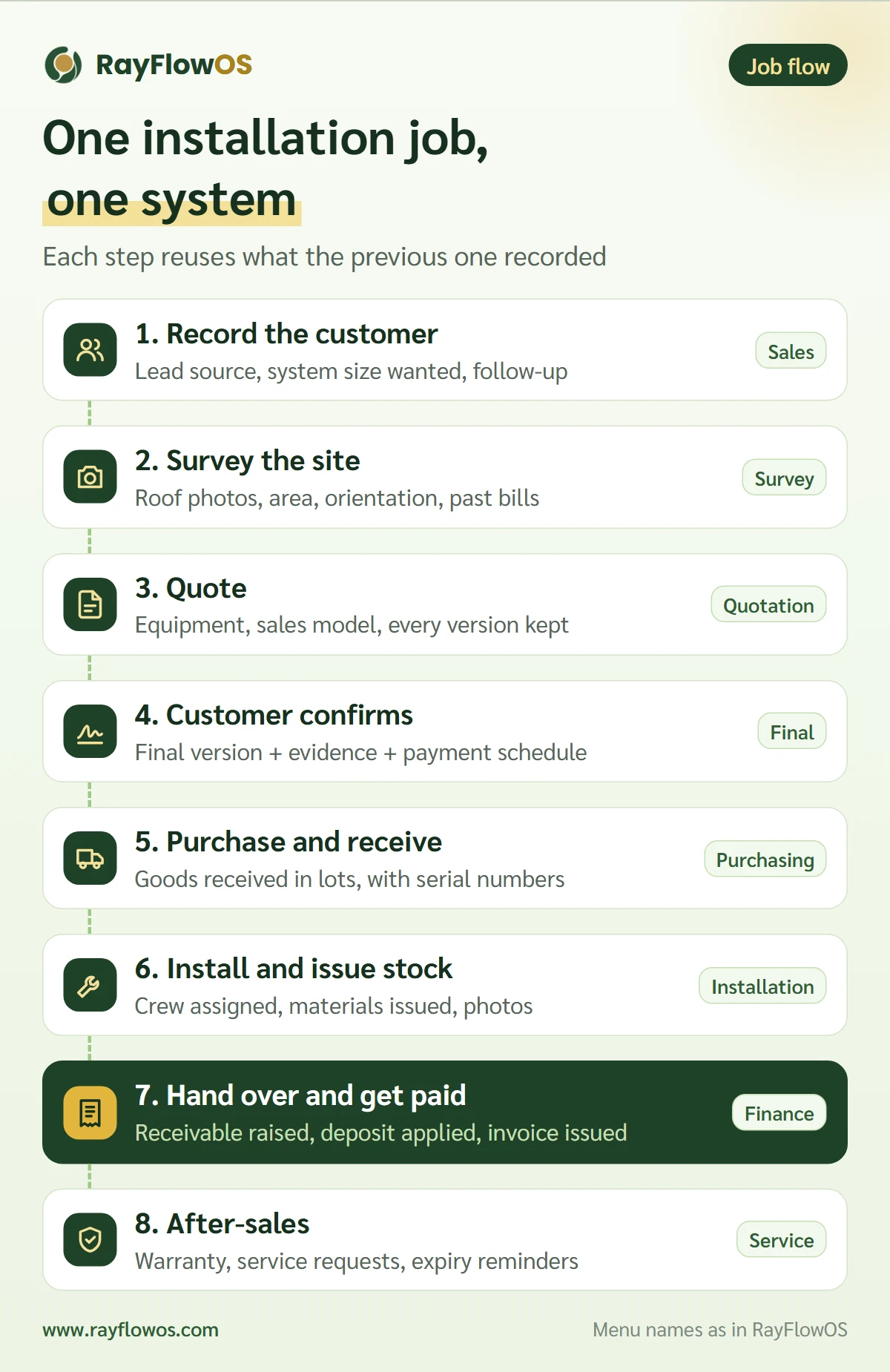
- Record the customer: name, where they heard of you, the system size they want and a follow-up date.
- Survey the site: roof photos, usable area, orientation and past electricity bills, attached to the customer.
- Quote: pick equipment from your product list, choose the sales model, and keep every revision as a new version.
- Customer confirms: mark the signed version as final, attach the evidence, and generate the payment schedule for instalment deals.
- Purchase and receive: raise purchase orders and receive goods in lots, with serial numbers.
- Install and issue stock: assign the crew, issue materials to the job and attach site photos.
- Hand over and get paid: confirm the handover, let the system raise the receivable and apply the deposit, then issue the receipt or tax invoice.
- After-sales: issue the warranty, log service requests and get reminded before warranties expire.
Whenever a step happens outside the system, the chain breaks at that point. Issue stock without linking it to the job, for example, and that job's cost is incomplete.
Eight capabilities to look for
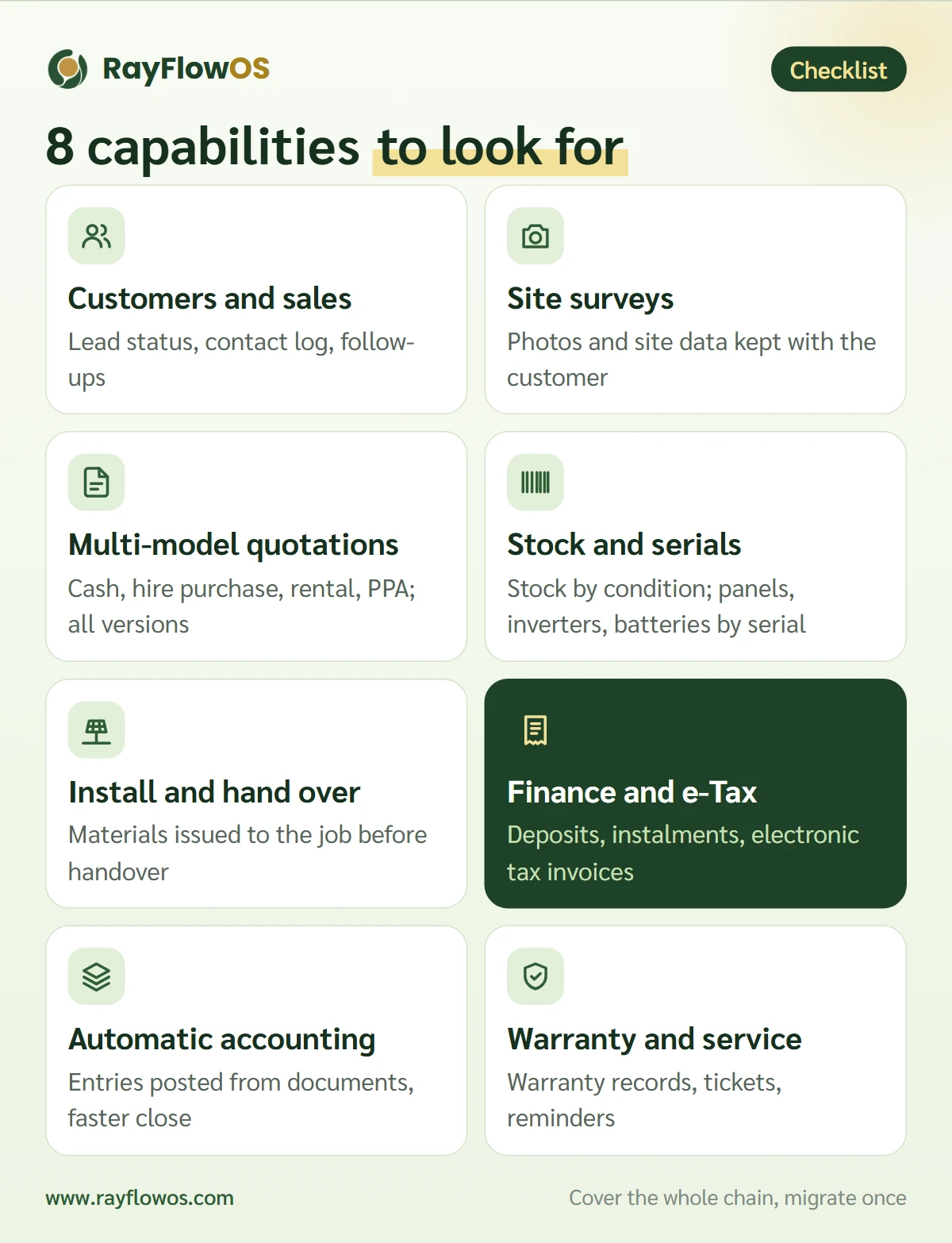
1. Customers and sales pipeline
See whether each contact is a lead, in negotiation or a customer. Log every call and never lose a follow-up.
2. Site survey records
The survey is the foundation of the quotation. Photos, roof dimensions and past bills belong to the customer record, not to the surveyor's phone.
3. Quotations with full version history
Customers ask for changes. The system should keep every version and tell you instantly which one was signed. Our solar quotation guide covers what a winning quotation contains.
4. Purchasing, stock and serial numbers
Stock should be split by condition, such as good, returned, awaiting claim and damaged, and key equipment should be traceable by serial number. See solar inventory with serial numbers and FIFO.
5. Installation and handover
Dispatch the crew, issue materials, attach photos and confirm the handover. A good system refuses a handover that has no stock issue behind it, because the job's cost would silently disappear.
6. Finance, tax invoices and e-Tax
Receipts and tax invoices should come from the same system as the job: deposits, instalments and electronic tax invoices. e-Tax matters more than ever, since Thai homeowners who claim the solar rooftop tax deduction need an e-Tax Invoice from the installer.
7. Accounting posted from documents
When you issue a receipt, receive goods or hand over a job, the system should post the journal entry for you from rules you control. Accountants stop re-keying and close the month faster.
8. Warranty and after-sales
Panel performance warranties often run for decades. Keep the warranty records, log service tickets and get reminded before a warranty or contract ends. Our O&M checklist covers the field side.
Spreadsheets versus one system
| Topic | Excel + chat groups | One system |
|---|---|---|
| Quotations | Many files, many versions | Every version in one place, final one marked |
| Serial numbers | Handwritten or missing | Traceable to the job |
| Outstanding balances | Ask the salesperson | Read from the payment schedule |
| Job cost | Assembled at year end | Pulled from stock issues and linked purchase orders |
| Change history | Unknown | Every change recorded |
Spreadsheets are not wrong. They are flexible and everyone knows them. But once several people edit the same data, that flexibility is where the numbers stop matching.
Seven questions to ask before you choose
- Does it support the sales models you use? If you will ever sell on instalments or PPA, the system must build payment schedules and post them correctly.
- Does it track individual serial numbers, not just quantities on hand?
- Does it issue correct tax documents? Tax invoices, credit notes and e-Tax Invoices.
- Is each company's data truly separated? This matters for any online system shared by many companies.
- Can you set permissions by role? Your installers do not need to see the ledger.
- Is there a change history? Who changed what, and when.
- Can you start small? A free tier or a step-by-step rollout lets you prove the team will use it before you invest.
Where RayFlowOS fits
RayFlowOS is built specifically for solar installation contractors. It runs in a web browser with nothing to install, and every company's data is kept separate. Its menus follow the job flow above: customers and sales, site surveys, quotations, installations, stock, and finance with receipts and tax invoices. (The application screens are in Thai.)
- Quotations support four sales models (cash, hire purchase, rental and PPA), and every edit is saved as a new version.
- Stock is split into good, returned, claim and damaged, and panels, inverters and batteries are traceable by serial number.
- Confirming a handover raises the receivable and applies the deposit automatically.
- Journal entries are posted from rules each company can adjust, with month-end closing and a ledger lock.
- Every module keeps a revision history and an audit log.
The starter plan is free. Some capabilities, such as rental and PPA sales or e-Tax, are part of higher plans, and you can change plans later without losing data.
Rolling it out so the team actually uses it
- Start with sales. Have salespeople record customers and quotations in the system first; it pays off fastest.
- Clean up your product list. Codes, model names, and which models need serial numbers.
- Set permissions by role. Sales, crew, warehouse and accounting each see their own menus.
- Move one area at a time. Once sales runs smoothly, switch on purchasing, then stock, then accounting.
- Pick a clear start date. New jobs from that day go into the system; old jobs are closed out gradually.
FAQ
How is solar business software different from accounting software?
Accounting software focuses on tax documents and the ledger. Solar business software also covers everything before that: sales, site surveys, inventory, serial numbers and installations, and it hands the results to accounting.
Does a small team of three to five people need it?
Small teams have the least spare time for re-keying data. Starting with one system while the job count is low keeps your data clean and lets you grow without migrating.
Do I need to install anything?
No. RayFlowOS runs in a web browser, so it works in the office and on site.
Will our data be mixed with other companies' data?
No. Every query is limited to the user's own company at the database layer, and users of one company cannot see another company's records.
Can we import our existing Excel data?
Yes. Contact the team with your current files and they will help you prepare them for import.
The bottom line
A solar installation business is a chain of connected steps. The right software is not just an invoicing tool; it follows the job from the first phone call to the day your crew returns to clean the panels a year later. Choose a system that supports your sales models, tracks serial numbers, and lets accounting work from the same documents as sales.
Start using RayFlowOS for free and run one real job through it →